

Collectors: Follow 10 quick diagnostics and maintenance checks to fix an electronic humidor not cooling and protect your cigars before calling a technician.
Most cooling failures trace to one of four culprits: a power or controller fault, blocked airflow, an ambient temperature outside the unit’s design range, or a failing cooling kit and compressor. Start with the simplest checks first: power at the outlet, the controller display, and the fan, before you suspect anything mechanical. If those pass and the cabinet still runs warm, work through the diagnostic order below rather than opening any sealed refrigeration components yourself.
TL;DR:
- Power and airflow issues are the primary causes of cooling failures, often related to a tripped breaker, blocked vents, or dusty fans.
- Ambient temperatures outside the recommended 64 to 78°F range can cause the compressor to cycle excessively or fail to cool effectively.
- Frost buildup or warm exhaust air indicates a potential problem with the cooling kit or compressor, needing professional diagnosis.
- A miscalibrated hygrometer can falsely signal a cooling failure, so calibration checks are essential before repairs.
- Sealed refrigeration components should only be serviced by qualified technicians to avoid voiding warranties or causing further damage.
Table of Contents
- Ten Fast Checks Before You Diagnose Anything Deeper
- How Do You Test the Power and Controller for Faults?
- Why Is Airflow Blocking Your Humidor’s Cooling?
- What Do Warm Exhaust Air and Frost Buildup Mean?
- Does Room Temperature Explain Why Your Humidor Won’t Cool?
- Could a Weak Door Seal Be the Real Problem?
- Is Your Hygrometer Lying to You?
- When Should You Call a Refrigeration Technician?
- What’s the Right Maintenance Schedule to Prevent This Again?
- Could a Power Outage or Surge Be the Cause?
- Is a Water Reservoir or Humidity Unit Affecting Cooling?
- Dunn’s Perspective: Why Precision and Service Still Matter
- Ready for a Humidor That Actually Holds Its Climate?
- Manuals and Support Pages Worth Bookmarking
- Sources
- FAQ
Ten Fast Checks Before You Diagnose Anything Deeper
Run through these before assuming the worst. Most units that seem dead are simply misconfigured, blocked, or sitting in the wrong spot.
- Confirm the outlet has power. Plug in a lamp or phone charger to test it.
- Reset the breaker if the outlet is dead, then retest.
- Check the controller display against the setpoint. A blinking number often means the unit hasn’t reached target yet.
- Confirm the door is fully closed and latched.
- Inspect the gasket for gaps or debris.
- Make sure nothing (bottles, boxes, cigar drawers) blocks the internal fan or vents.
- Look inside for frost buildup or pooled moisture.
- Listen for the compressor cycling on and off; note how often.
- Move the unit away from direct sunlight, vents, or nearby heat sources.
- Verify the room temperature falls within the manufacturer’s recommended range.
Pro Tip: If your unit lost power during an outage, don’t open the door to check on your cigars. Manufacturer guidance notes that a short outage of an hour or two rarely causes damage, but opening the door lets in warm, dry air exactly when the cabinet needs to hold its climate.
How Do You Test the Power and Controller for Faults?
A humidor that seems “dead” is often just a tripped breaker or a controller stuck in a normal warmup cycle. Before assuming mechanical failure, isolate the electrical side.
- Test the outlet with a second device. If nothing powers on, check the breaker panel before touching the humidor itself.
- Watch the display closely. A flashing setpoint number usually means the unit is still working toward target temperature, while a steady readout that won’t move despite hours of runtime signals a real problem.
- Manufacturer support pages describe checking PC board LED indicators as an early diagnostic step. Solid green usually means normal operation, while certain red patterns point toward a board or cooling-kit fault worth reporting to support.
- Frequent cycling isn’t automatically bad. It’s often normal in warm rooms, but rapid, short cycling paired with a warm interior suggests the ambient temperature is fighting the compressor.
Why Is Airflow Blocking Your Humidor’s Cooling?
Cold air needs somewhere to go. When the internal fan is dusty or a drawer sits too close to the vent, cooling capacity drops even though every electrical component works perfectly.
- Locate the fan and dust trap, usually near the back panel or base, and check for visible buildup.
- Clean the fan and dust trap gently with a soft brush or vacuum attachment. Manufacturers recommend doing this roughly every three months to keep cooling performance steady.
- Rearrange shelves and drawers so nothing sits directly against the fan housing. Dense cigar boxes stacked near the vent are a common, overlooked cause of warm spots.
- If the fan doesn’t spin at all despite confirmed power, treat that as a hardware failure and check our fan noise troubleshooting guide before contacting support.
Pro Tip: A humidor packed floor to ceiling with cigars can choke its own airflow. Leave a finger’s width of clearance around vents even when your collection is at capacity.
What Do Warm Exhaust Air and Frost Buildup Mean?
Once power and airflow check out clean, the next stop is the cooling kit itself.
- Feel the exhaust vent, usually on the back or bottom of the unit. Warm air here means the compressor is actively working. No warm air at all often points to a failed cooling kit or compressor.
- Check for frost inside the cabinet. Manufacturer manuals note that auto-defrost typically only activates if internal temperature drops below a certain low temperature threshold for an extended stretch, so frost outside that pattern can signal a sensor or seal issue.
- If frost appears without an obvious cause, try raising the setpoint slightly and monitoring for 24 hours before assuming a component failure.
- Reserve any cooling-kit replacement, sealed-circuit work, or PC board swap for a qualified refrigeration technician. Opening sealed components yourself risks both your cigars and your warranty.
Does Room Temperature Explain Why Your Humidor Won’t Cool?
Ambient conditions are the most underestimated cause of humidor complaints. Electronic units aren’t designed to fight a hot garage or a sunlit corner of a den, they’re designed to maintain a modest gap between room temperature and setpoint.
- Most manuals list an ideal ambient range of roughly 64 to 78°F, though some models extend to 68 to 80°F.
- Freestanding units generally need about five inches of clearance on the back and sides to expel warm exhaust air properly.
- Basements, garages, and rooms near radiators or windows routinely push units outside their design range.
- When ambient temperature runs high, the compressor cycles constantly and still can’t close the gap, which looks exactly like a broken unit even when nothing is wrong internally.
Could a Weak Door Seal Be the Real Problem?
A gasket that’s compressed, cracked, or dirty lets warm air seep in continuously, forcing the compressor to run overtime while the interior still climbs.
- Run the classic paper test: close a sheet of paper in the door and try to pull it out. Heavy resistance means a good seal; easy sliding means the gasket needs attention or replacement.
- Avoid loading large quantities of cigars all at once. Adding humidity and mass in one dump forces the system to work overtime; staged loading over a few days lets it recover.
- Reposition shelves and drawers so nothing blocks the fan path or the vent behind the door.
- Order a factory replacement gasket rather than a generic substitute if the seal has lost its grip permanently.
Is Your Hygrometer Lying to You?
Before you replace a single part, confirm the numbers you’re reading are even accurate. A miscalibrated hygrometer can make a perfectly healthy cooling system look broken.
- Run the salt test: seal the hygrometer in a plastic bag or container with a small dish of salt moistened with a few drops of water.
- Wait roughly eight hours. A properly calibrated hygrometer should read close to 75% RH in that environment.
- If it’s off by more than a couple of points, recalibrate or replace it before assuming a mechanical fault.
- Cross check with an independent probe thermometer and hygrometer placed inside the cabinet. If the secondary reading matches the target better than the built in controller, the problem may be the sensor, not the compressor. For target numbers to aim for day to day, see our guide on stable humidity settings.
When Should You Call a Refrigeration Technician?
Some symptoms simply aren’t DIY territory. Sealed refrigeration circuits are precision systems, and cracking one open yourself almost always voids the warranty and risks a total loss of the cooling kit.
- No warm air at the exhaust after 30 minutes of runtime, paired with a warm interior, usually means compressor or cooling-kit failure.
- Red or abnormal PC board LED patterns that don’t clear after a power cycle.
- Persistent frost despite a stable setpoint above the defrost threshold.
- Unusual grinding, clicking, or buzzing from the compressor area.
Before calling, write down exactly what you observed, exhaust temperature, LED pattern, fan behavior, any frost or noise. That single page of notes turns a vague service call into a five-minute diagnosis.
What’s the Right Maintenance Schedule to Prevent This Again?
Most cooling failures are preventable with a few minutes of attention on a set schedule rather than a scramble after the fact.
- Monthly: confirm the controller setpoint hasn’t drifted, check the door seal by feel, and note the room’s temperature range.
- Quarterly: clean the fan and dust trap, and confirm five inches of rear and side clearance remain unblocked.
- Annually: have a technician inspect the cooling kit, electrical connections, and controller board before problems start.
- Keep a short log, even a note on your phone, recording setpoints, cleaning dates, and any odd readings. It cuts diagnostic time in half the next time something feels off.
Pro Tip: Set a recurring reminder tied to a season change. Spring and fall are when ambient swings are most likely to push your humidor outside its rated range.
Could a Power Outage or Surge Be the Cause?
If your humidor stopped cooling right after a storm, a brief blackout, or a flickering light in the house, suspect the electrical event first, not the compressor. Power surges can trip internal protection circuits or, on older units without surge protection, damage the PC board outright.
Start by unplugging the unit completely for two full minutes, then plugging it back in. Many controllers reset cleanly this way and resume normal cycling within an hour. If the display stays blank or shows an error code after the reset, that points toward surge damage to the board rather than a mechanical fault.
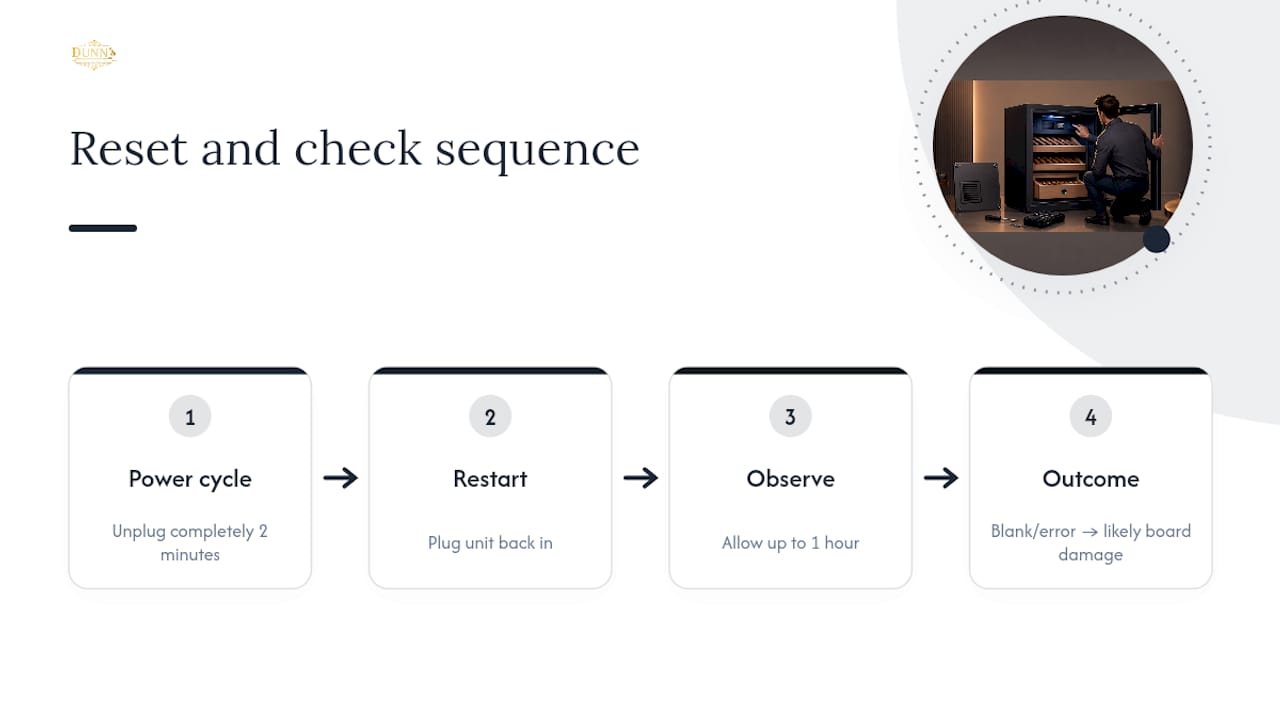
A battery backup or a dedicated surge protector isn’t standard equipment on most electronic humidors, which is worth knowing before you assume the unit itself failed. If you live somewhere with frequent outages, an inexpensive surge protector on that outlet is cheap insurance against a $2,000 cooling kit repair. For outages themselves, short interruptions of an hour or two typically don’t harm cigars as long as the door stays shut, preserving the humidity buffer already built into the cabinet air. Longer outages call for more active protection, moving cigars to a backup cooler or a well-buffered travel case until power and cooling resume.
Is a Water Reservoir or Humidity Unit Affecting Cooling?
Humidity control and temperature control run on separate systems inside most electronic humidors, but they interact more than owners expect. A flooded or overfull water reservoir can drip onto internal components, including fan housings and sensor wiring, causing erratic readings that mimic a cooling failure.
Check the reservoir or humidification unit for overflow, algae buildup, or mineral scale from tap water. Scale buildup restricts the humidifying element’s output, which forces the system to run more aggressively and generates extra internal heat, oddly enough making the cabinet feel warmer than it should. Use distilled water only, and empty and rinse the reservoir on the same quarterly schedule as your fan cleaning.
If you notice condensation collecting on interior walls rather than staying contained in the reservoir, that’s usually a sign the humidity unit is overcompensating for a seal or sensor issue elsewhere, not a standalone cooling problem. Address the gasket and hygrometer accuracy first; in most cases, the humidity system settles down once the actual temperature fault is resolved. Wooden desktop units are especially sensitive here, since the buffering materials and seal quality inside a wood cabinet respond differently to excess moisture than the acrylic and steel interiors common in electronic coolers.
Dunn’s Perspective: Why Precision and Service Still Matter
We’ve watched enough support tickets to know that most “broken” humidors are simply mismatched to their environment or overdue for basic care. That’s the case for buying purpose-built, not generic, equipment. A collection that’s outgrown a single desktop unit deserves a cabinet or bespoke solution engineered for its footprint, not a patchwork of space heaters and box fans. Precision climate control, backed by real service support, is what protects an investment measured in thousands of dollars, not hundreds.
— Belle Dunn
Ready for a Humidor That Actually Holds Its Climate?
This specialist retailer focuses on serving collectors who find their current cigar storage insufficient and in need of upgrade. If you’re tired of troubleshooting a unit that fights its own compressor every summer, the Electronic Humidors collection is built around the same manufacturer-grade cooling kits and PC board diagnostics covered above, just without the guesswork of buying blind online.
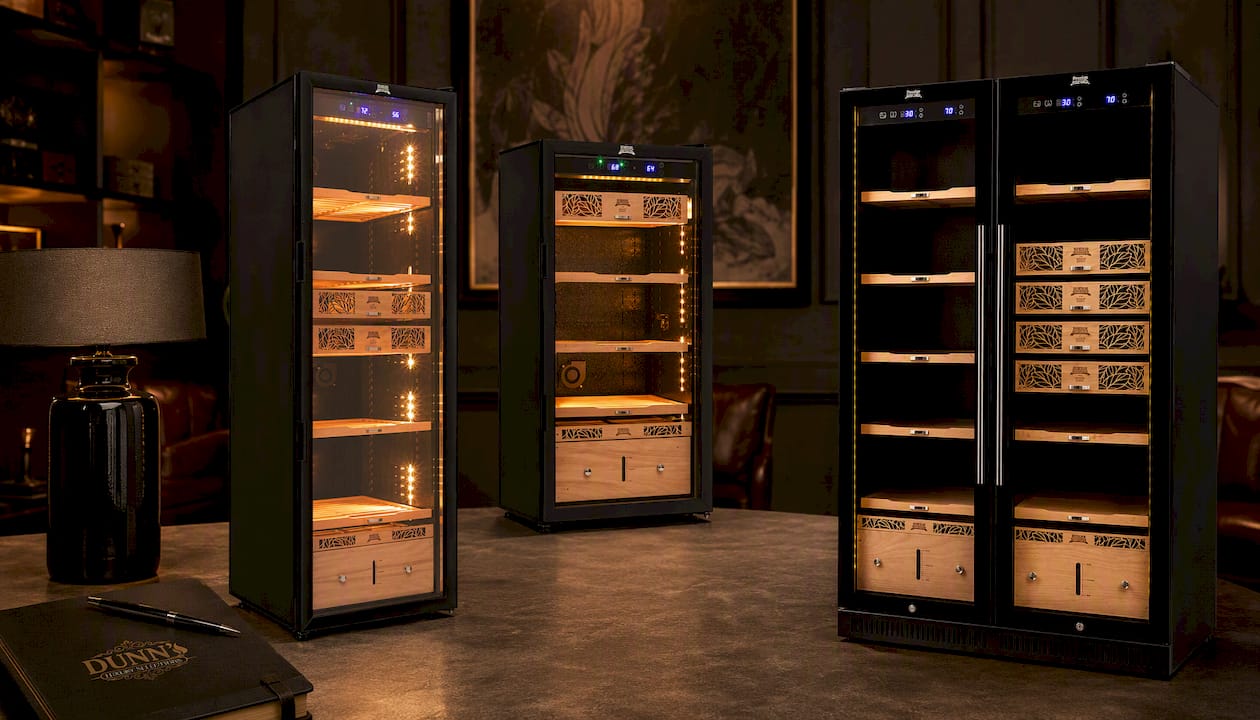
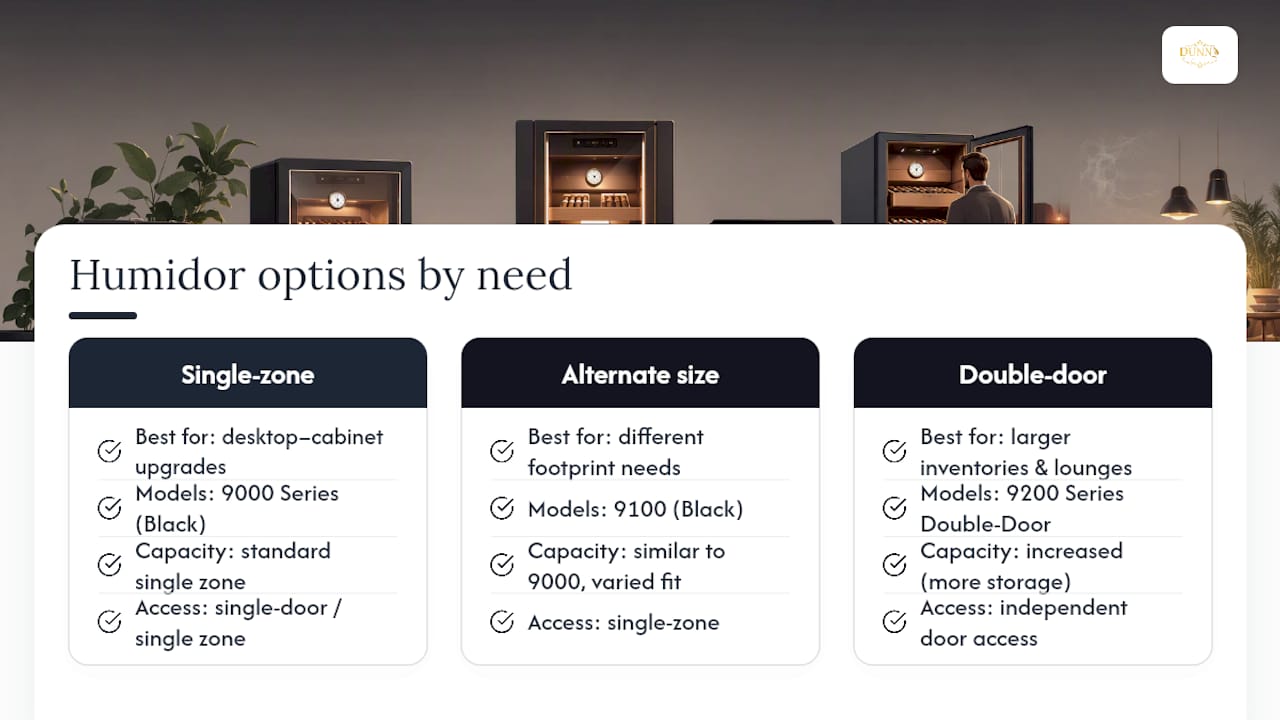
For a straightforward single-zone replacement, the Humidor Supreme® Electronic Humidor, 9000 Series Black covers most desktop-to-cabinet upgrades cleanly. Need a slightly different footprint or feature set? The Humidor Supreme® Electronic Humidor, 9100 Black offers an alternate size worth comparing before you commit. Collectors managing larger inventories, or lounges serving multiple members, tend to gravitate toward the Humidor Supreme® 9200 Series Double-Door Electronic Humidor (Black), which adds capacity and independent access without splitting climate zones.
If your collection has outgrown any standard cabinet entirely, Dunn’s Bespoke builds custom walk-in and installed solutions with white-glove delivery and expert consultation from day one. Browse Cabinet Humidors, Desktop Humidors, or Travel Humidors depending on where your storage gap actually sits, and round out any setup with calibrated hygrometers and beads from our Accessories collection. Reach out through the site to request a consultation to help match capacity, climate precision, and budget to your actual collection, not a generic spec sheet.
Manuals and Support Pages Worth Bookmarking
Model-specific steps always outrank general advice, so keep your unit’s manual on hand before troubleshooting further. The NEEDONE 23L Electronic Cooler manual covers ambient range and fan cleaning cadence. The Whynter CHC-122BD manual details hygrometer calibration and common fault symptoms. NewAir’s NCH250 series support page and its NCH1K5BK00 manual walk through PC board diagnostics and defrost thresholds. When your symptoms don’t match what’s here, contact the manufacturer directly before attempting any repair.
Sources
FAQ
Why Is My Electronic Humidor Not Cooling At All?
The most common causes are a power or controller fault, a blocked fan, ambient temperature outside the recommended range, or a failed cooling kit. Work through electrical and airflow checks before assuming a compressor failure.
Why Is My Humidor Warm Inside Even Though the Fan Runs?
A running fan with a warm interior usually points to ambient temperature outside the manufacturer’s recommended range or a cooling kit that’s cycling but not generating enough cold air. Check the exhaust for warm air and confirm room temperature falls within spec.
How Do I Know If My Hygrometer Is Giving a False Reading?
Run the salt test: seal the hygrometer with a moistened salt dish for about eight hours and confirm it reads close to 75% RH. A reading off by several points can make a functioning cooler look like it’s failing.
Can I Fix a Failed Compressor Myself?
No. Sealed refrigeration circuits require a qualified refrigeration technician, and opening them yourself typically voids the manufacturer’s warranty. Diagnostic checks like exhaust temperature and PC board LEDs are safe to run yourself.
Does Dunn’s Luxury Selections Sell Replacement Electronic Humidors?
Yes. The Electronic Humidors collection includes single and double-door models suited to replacing an unreliable unit, and Dunn’s Bespoke handles custom sizing for larger collections.
What Ambient Temperature Should My Humidor’s Room Stay At?
Most manuals recommend keeping the room between roughly 64 and 78°F, with some models rated up to 80°F. Rooms with direct sunlight, radiators, or garage-level temperature swings routinely cause cooling complaints.
Recommended
You May Also Enjoy
Cigar Locker Dimensions: Sizing Guide for Collectors and Lounges
Cigar locker dimensions explained: compartment sizes, cabinet footprints, capacity math and clearances, so you size a locker bank...
Read Article
Sealing a Walk-In Humidor: Envelope, Door and Penetrations
How to seal a walk-in humidor properly: vapor barrier placement, door gasket, penetrations and the controlled airflow a...
Read Article
Retail Humidor ROI: How to Measure What a Display Earns
What does a retail or lounge humidor really return? A practical framework for cigar shops, lounges and clubs:...
Read Article